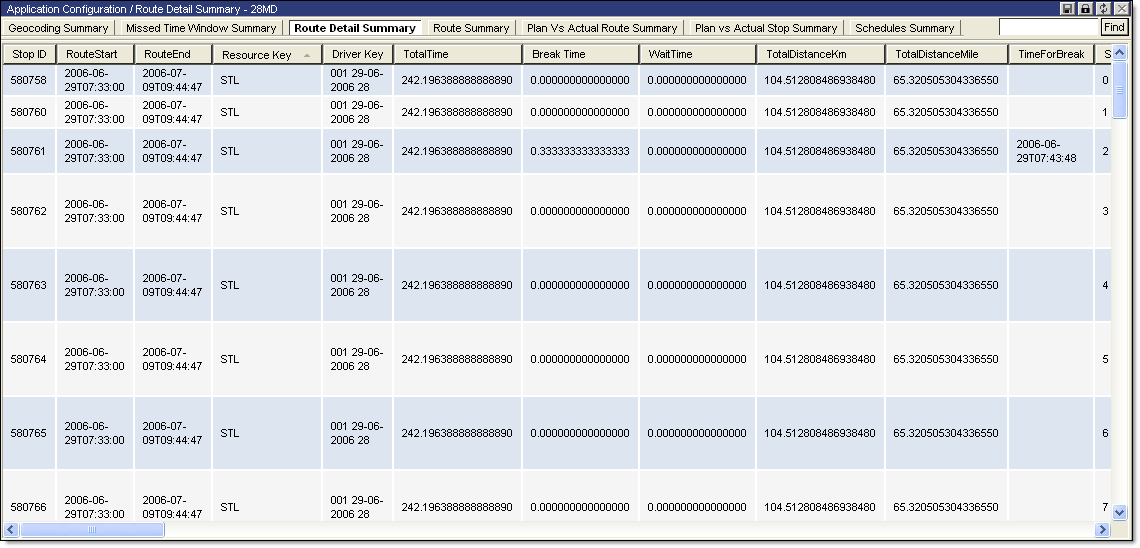
To view the Route Detail Summary report:
· From the main menu, select Summary Reports > Route Detail Summary. The Route Detail Summary page is displayed.
The Route Detail Summary report displays the following information:
|
· Stop ID |
· Planned Depart Date |
|
· Route Start |
· UDF String1-9 |
|
· Route End |
· Order Key |
|
· Resource Key |
· Window Type |
|
· Driver Key |
· Measure1-3 |
|
· Total Time |
· Requirements |
|
· Break Time |
· Order Service Time |
|
· Wait Time |
· Stop Service Time |
|
· Total Distance Km |
· Drive Time |
|
· Total Distance Mile |
· Elapsed Time |
|
· Time for Break |
· Distance Km |
|
· Stop Number |
· Distance Mile |
|
· Territory |
· Not Served For Any Reason |
|
· Location Key |
· Location Not Resolved |
|
· Company |
· Previous Task Not Served |
|
· Ship Street Name |
· Requirements Not Met |
|
· Ship City |
· Job Time Window Missed |
|
· Ship Date |
· Capacities Exceeded |
|
· Ship Zip Code |
· Too Many Stops |
|
· Contact Phone |
· Dispatch Out of Sequence |
|
· Latitude |
· Wrong Preferred Resource |
|
· Geocode Quality |
· Near Time Window Close |
|
· Geocode Score |
· Wrong Route Position |
|
· Geocode Latitude |
· Dispatch Unassigned |
|
· Gecode Longitude |
· Dispatch Completed |
|
· Geocode Source |
· Dispatch Untimed |
|
· Open Date |
· Resource Time Constraint Missed |
|
· Open Time |
· Invalid Resource |
|
· Close Date |
· Exceeded Maximum Distance |
|
· Close Time |
· Too Many Prototype Children |
|
· Planned Arrived Date |
· Stop Has Received Time Begun Update |
|
· Planned Begun Date |
· Arrived Time Set For Stop |
|
· Planned Completed Date |
· Violation Description |
